
Why can't I see my Session in the Dashboard?
If you’re unable to find a Session you recorded in the TopMod QA Dashboard, this guide will walk you through the possible causes and how to resolve them.
I recorded a Session, but it hasn’t appeared in the Dashboard
To ensure your Session appears correctly, please follow these steps:
1. Check your internet connection
TopMod QA requires an active internet connection to create a Session in the Dashboard as soon as you start recording. Make sure your connection is stable and functioning during the session.
2. Don’t discard Sessions you want to keep
The “Discard Session” button permanently cancels the Session. To save your recording, always click “Complete Session” at the end.
⚠️ If you accidentally discard a session you intended to keep, please contact support@topmodqa.com. We will do our best to recover it.
I can no longer access a Session in the Dashboard
If a Session that was previously visible is no longer accessible, consider the following:
1. Confirm you’re using the correct version of the application
If you've participated in testing beta versions of TopMod QA, you may have used a non-production environment. Beta versions are separate from the live system, and Sessions recorded there won’t appear in the standard Dashboard.
To verify you're on the correct version:
-
Open the application and check the footer.
-
If you see a blue square with an “S”, you're using a staging or test version (see below for an example). Please switch to the production version of TopMod QA.
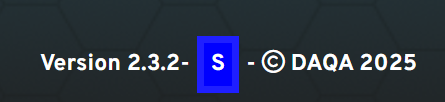
2. Check if the Session was deleted by another user
Project leads and managers have permission to delete Sessions. If a Session is missing, confirm with your team whether it was intentionally removed.
🛠 If a session was deleted in error, reach out to support@topmodqa.com and we will attempt to recover it.
Still having trouble?
If you continue to experience issues, please contact our support team at support@topmodqa.com.