
Why can't I see my Session in the Dashboard?
ThisIf article provides guidance on what to do if you areyou’re unable to seefind youra SessionsSession you recorded in the dashboard.TopMod QA Dashboard, this guide will walk you through the possible causes and how to resolve them.
I recorded a SessionSession, but it hasn'hasn’t appeared in the dashboard yetDashboard
To ensure all of your SessionsSession areappears available in the dashboard,correctly, please completefollow the followingthese steps:
EnsureCheckyouyourhaveinternetaconnection
TopModreliableQA requires an active internet connectionactiveDo2.notDon’t discardany SessionSessions youwishwant to keepTopModTheQA“DiscardoffersSession”usersbutton permanently cancels theabilitySession.to cancel their Sessions at any time using the "Discard Session" button. If you wish toTo save yourSession,recording, always click “Complete Session” at theendend.of the Session click the "Complete Session" button.
1. TopModto QA immediately createscreate a Session in the dashboardDashboard whenas soon as you start arecording. sessionMake insure the recording application and therefore, an internetyour connection is neededstable toand capturefunctioning yourduring testthe session.
⚠️ If you
doaccidentally discardyourasession,session you intended to keep, please contactsupport (support@topmodqa.com).and weWe willattemptdoaourrecoverybestontotherecoverSession.it.
I amcan no longer able to access a Session in the dashboardDashboard
If you were previously able to access a Session inthat thewas dashboardpreviously butvisible canis no longer doaccessible, this, please completeconsider the following steps:following:
EnsureConfirmyou areyou’re using the correctapplication and dashboard versionsIf you have previously participated in testing of new versions of the application, you may have been using a betaversion of the application-
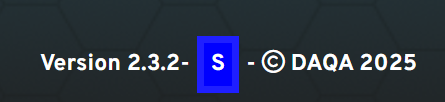
Open the application and check the footer.
-
If you see a blue square with an “S”, you're using a staging or test version (see below for an example). Please switch to the
live,production version oftheTopModproduct.QA.In Confirm2.yourChecksessionifhasn'tthebeenSession was deleted by another userYourprojectProject
leads/leads and managers havethe abilitypermission to deleteyourSessions.SessionsIfshouldatheySessionwish.isPleasemissing,checkconfirm withthemyourbeforeteamcontactingwhethersupportittowasensureintentionallytheyremoved.haven'tdeleted🛠
the Session.
If a sessionhaswasbeendeletedincorrectlyindeleted,error,pleasereachcontactoutsupportto(support@topmodqa.com)and we will attemptatorecoveryrecoveronit.theSession.
1.
If whichyou've sitsparticipated separatelyin testing beta versions of TopMod QA, you may have used a non-production environment. Beta versions are separate from the live system, and Sessions recorded there won’t appear in the standard Dashboard.
To verify you're on the correct version:
Still
If you continue to experience issues, please contact our support team at support@topmodqa.com.