Why can't I see my recorded Sessions in the Dashboard?
This article provides guidance on what to do if you are unable to see your Sessions in the dashboard.
I recorded a Session but it hasn't appeared in the dashboard yet
To ensure all of your Sessions are available in the dashboard, please complete the following steps:
- Ensure you have a reliable internet connection active
TopMod QA immediately creates a Session in the dashboard when you start a session in the recording application and therefore, an internet connection is needed to capture your test session. - Do not discard any Session you wish to keep
TopMod QA offers users the ability to cancel their Sessions at any time using the "Discard Session" button. If you wish to save your Session, at the end of the Session click the "Complete Session" button.
If you do accidentally discard your session, please contact support (support@topmodqa.com) and we will attempt a recovery on the Session.
I am no longer able to access a Session in the dashboard
If you were previously able to access a Session in the dashboard but can no longer do this, please complete the following steps:
- Ensure you are using the correct application and dashboard versions
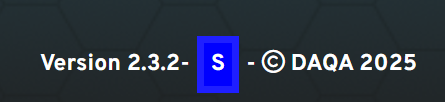
If you have previously participated in testing of new versions of the application, you may have been using a beta version of the application which sits separately to the live, production version of the product. In this case, you will need to make sure you are using the correct version. To check this, ensure your footer does not include a "S" in a blue square, as seen below.
- Confirm your session hasn't been deleted by another user
Your project leads/managers have the ability to delete your Sessions should they wish. Please check with them before contacting support to ensure they haven't deleted the Session.
If a session has been incorrectly deleted, please contact support (support@topmodqa.com) and we will attempt a recovery on the Session.